https://bobrov.dev/blog/angular-smart-404-page/
Typos in the URL is a straightforward way to 404 page. But could we make user experience in that situation better? For example, could we provide a user with the correct path? Today I will show how to make a prediction of the correct location on 404 page without machine learning and magic.
The example app is build using Angular 7.1.0 and Angular CLI 7.1.2. But the code should work with any Angular version without any major problems.
Why?
What is the problem with a standard “Not found” pages? Usually, it doesn’t help to find the correct address to the resource user looks for. It might contain a link to the home page or navigation list. But find content that neede at the moment might be so hard. How we can solve this problem? It will be great if we can look at the existing sitemap or routes list and find one that could be what user means.
If we are speaking about modern JS frameworks and Angular in particular we already have all the links across our app as a router configuration. This solves the lookup source part.
What?
OK, when we can parse the link provided by a user? The best place for that might be a router guard. If we want to pass data to the 404 component we can use resolve guard. To be honest, I haven’t found real cases of usage resolvers in applications I’ve worked on, so I’m very happy that I found a use case for them.
Well, the only missing piece of the solution is how to understand what the user wanted to see? You might think about neural networks. We could train a model based on some dataset, for example, analytics. But this may be a big overhead and require two additional steps: gather analytics and train a model using it. There is another solution that could work - Levenshtein distance algorithm. What is that? Levenshtein distance is a number of operations (insert, move, delete character) need to be performed to transform one string to another. It is quite simple and won’t take a lot of lines of code in TypeScript. I can say that you already met this algorithm. Wondering where? Think about typos handled by CLI tools for example, git. If you do a typo in git command it will try to suggest you a correct one:
git cone
git: 'cone' is not a git command. See 'git --help'.

The most similar command is clone
And even more the same algorithm is used in Angular CLI 🤯:
ng ganerate
The specified command ("ganerate") is invalid.
For a list of available options, run "ng help".

Did you mean "generate"?
How?
How to use Levenshtein distance to suggest a correct value? We need the list of correct values - commands in case of CLI tool and paths in case or routing. Let call it a dictionary. We have an invalid user input. Then we need to calculate a distance between user input and each entry in our dictionary. The dictionary item with the smaller distance will be possible user wish. That means that we can sort the dictionary by the Levenshtein distance to an invalid value. And we are done.
In my example, I want to pass suggested path to “Page not found” component and show a message with a correct URL. You can try working demo. Try to enter an incorrect path after the /#/ and see the result. I’ve used hash location strategy only for demo purpose, as I want to handle 404 error by demo app instead of GitHub pages.
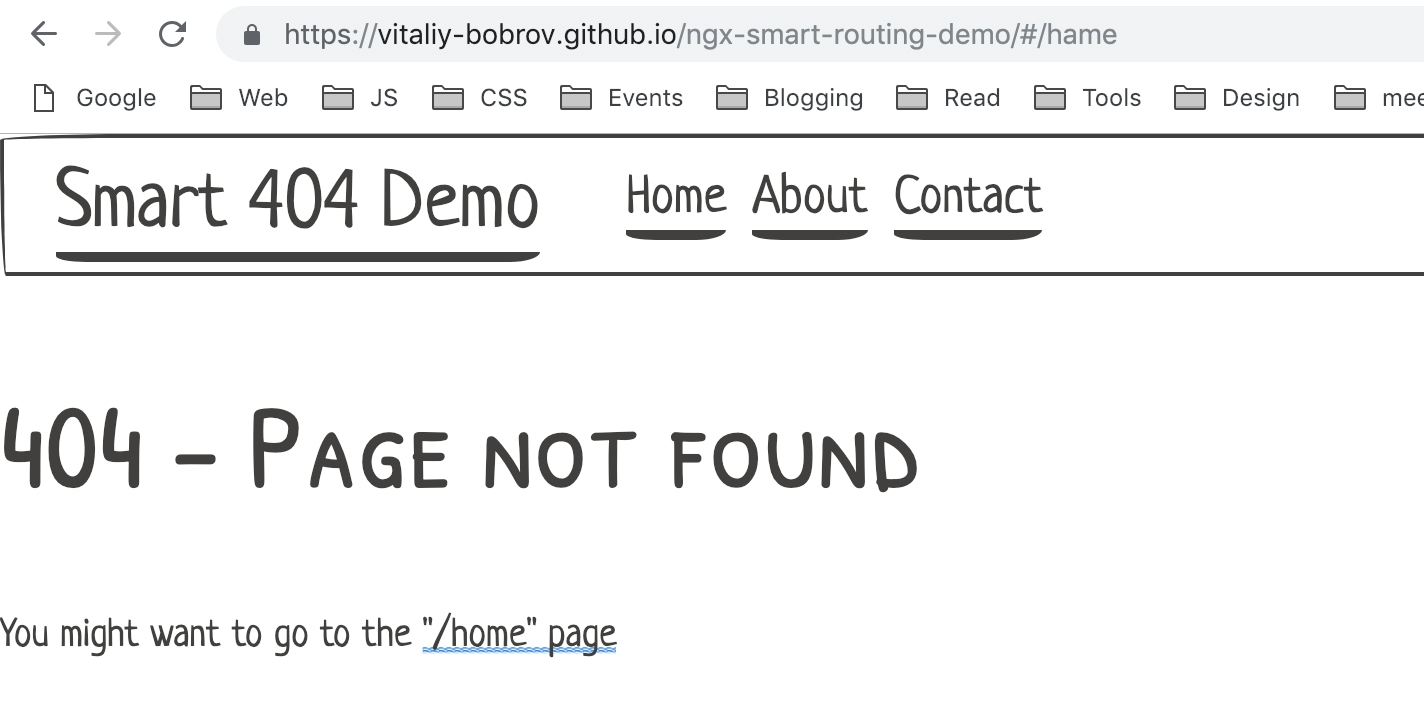
On the screenshot above I did a mistake and tried to navigate to “hame” page. Using resolve guard I showed a user the valid link - "/home". You can find the source code on GitHub repo.
Implementation
It was all about theory, but let me explain how to achieve the same result on your own. The app was created via Angular CLI. Then I generated three components home, about and contact. During the app creation, I choose routing option to generate a routing module. The first piece of a puzzle we need a dictionary. I decided to create a paths map - object with keys to having human-readable name and path string as a value. And saving this map into app-paths.ts file. In this case, I can use this mapping in router definitions and in the resolver.
// app-paths.ts

export const paths = {
  home: 'home',
  about: 'about',
  contact: 'contact'
}
Then inside app-routing.module.ts I used it for router definitions:
// app-routing.module.ts

const routes: Routes = [
  {
    path: '',
    pathMatch: 'full',
    redirectTo: paths.home
  },
  {
    path: paths.home,
    component: HomeComponent
  },
  {
    path: paths.about,
    component: AboutComponent
  },
  {
    path: paths.contact,
    component: ContactComponent
  },
  {
    path: '**',
    resolve: {
      path: PathResolveService
    },
    component: NotFoundComponent
  }
];
Everything else in this module is standard, they only thing was necessary in my specific case was useHash: true option for router module. The part of routing we will focus now is "**" path. It will match everything that hasn’t been found in the existing router configuration. Usually, it used for 404 views. So I also created NotFoundComponent and added path property to resolve configuration. To resolve path data it should use PathResolveService.
First, let take a look at NotFoundComponent:
@Component({
  selector: 'app-not-found',
  template: `

      404 - Page not found

    You might want to go to the "{{ path }}" page
  `
})
export class NotFoundComponent implements OnInit {
  path: string;

  constructor(private route: ActivatedRoute) {}

  ngOnInit() {
    this.route.data.pipe(take(1))
      .subscribe((data: { path: string }) => {
        this.path = data.path;
      });
  }
}
We are using activated route snapshot to get the path resolved by PathResolveService. This path is used in the component template to show a user-friendly message with the link to correct resource.
Now let’s switch to the final and most important part - the resolver. As any data resolve guard it can optionally implement Resolve interface:
@Injectable({
  providedIn: 'root'
})
export class PathResolveService implements Resolve<string | null> {
  resolve(
    route: ActivatedRouteSnapshot,
    state: RouterStateSnapshot
  ): string | null {}
}
Using RouterStateSnapshot we can get the URL entered by the user:
  resolve(
    route: ActivatedRouteSnapshot,
    state: RouterStateSnapshot
  ): string | null {
    const typoPath = state.url.replace('/', '');
    const threshold = this.getThreshold(typoPath);
    const dictionary = Object.values(paths)
      .filter(path => Math.abs(path.length - typoPath.length) < threshold);

    if (!dictionary.length) return null;

    this.sortByDistances(typoPath, dictionary);

    return `/${dictionary[0]}`;
  }
Let me explain what is going in the resolve method. After getting user input we calculating threshold - the maximum length delta between the input and correct value from paths dictionary. In my case I decided to use three for words less than five characters, otherwise 5. This allows filtering dictionary for values that hard to recognize as a typo. Here is the implementation of getThreshold method:
  getThreshold(path: string): number {
    if (path.length < 5) return 3;

    return 5;
  }
Then if we still have any possible entry we sort the dictionary by the Levenshtein distance to the input value. After that, we returning the first value from the sorted dictionary. The source code of sortByDistances method:
  sortByDistances(typoPath: string, dictionary: string[]) {
    const pathsDistance = {} as { [name: string]: number };

    dictionary.sort((a, b) => {
      if (!(a in pathsDistance)) {
        pathsDistance[a] = this.levenshtein(a, typoPath);
      }
      if (!(b in pathsDistance)) {
        pathsDistance[b] = this.levenshtein(b, typoPath);
      }

      return pathsDistance[a] - pathsDistance[b];
    });
  }
We created pathsDistance hashmap to store calculated distances values. By doing that we calculate the distance only once for each item in the dictionary. Then we used that mapping to sort the values. The main magic is stored in levenshtein method that holds the algorithm implementation. I took it from the Angular CLI source code as it the most efficient one written in TypeScript:
  levenshtein(a: string, b: string): number {
    if (a.length == 0) {
      return b.length;
    }
    if (b.length == 0) {
      return a.length;
    }

    const matrix = [];

    // increment along the first column of each row
    for (let i = 0; i <=< span=""> b.length; i++) {
      matrix[i] = [i];
    }

    // increment each column in the first row
    for (let j = 0; j <=< span=""> a.length; j++) {
      matrix[0][j] = j;
    }

    // Fill in the rest of the matrix
    for (let i = 1; i <=< span=""> b.length; i++) {
      for (let j = 1; j <=< span=""> a.length; j++) {
        if (b.charAt(i - 1) == a.charAt(j - 1)) {
          matrix[i][j] = matrix[i - 1][j - 1];
        } else {
          matrix[i][j] = Math.min(
            matrix[i - 1][j - 1] + 1, // substitution
            matrix[i][j - 1] + 1, // insertion
            matrix[i - 1][j] + 1, // deletion
          );
        }
      }
    }

    return matrix[b.length][a.length];
  }
We created the matrix of size N by M, where N is the length of the first string and N is the length of the second one. Then we iterating through the matrix and count the number of operations needed. Afterward, the last cell in the matrix will be the Levenshtein distance between strings. And we are done 😎.
Conclusion
There is no magic or rocket science to solve real problems that users might face. Using proper algorithms could solve such issues in the elegant and simple way. Next time you start to think about complex solution try to find an existing one that could fit your needs.


