Microsoft azure az900 part-6


Cloud security is a shared responsibility

For all cloud deployment types, you own your data and identities. You are responsible for helping secure your data and identities, your on-premises resources, and the cloud components you control (which vary by service type).

Regardless of the deployment type, you always retain responsibility for the following items:

  • Data
  • Endpoints
  • Accounts
  • Access management

A layered approach to security
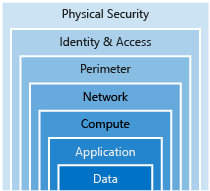


A great place to start when examining the security of your Azure-based solutions is Azure Security Center. Security Center is a monitoring service that provides threat protection across all of your services both in Azure, and on-premises. Security Center can:

    Identity and access

    Authentication and authorization

    Two fundamental concepts that need to be understood when talking about identity and access control are authentication and authorization. They underpin everything else that happens and occur sequentially in any identity and access process:

    • Authentication is the process of establishing the identity of a person or service looking to access a resource. It involves the act of challenging a party for legitimate credentials, and provides the basis for creating a security principal for identity and access control use. It establishes if they are who they say they are.

    • Authorization is the process of establishing what level of access an authenticated person or service has. It specifies what data they're allowed to access and what they can do with it.


    Azure provides services to manage both authentication and authorization through Azure Active Directory (Azure AD).

    Single sign-on

    With single sign-on (SSO), users need to remember only one ID and one password. Access across applications is granted to a single identity tied to a user, simplifying the security model. As users change roles or leave an organization, access modifications are tied to the single identity, greatly reducing the effort needed to change or disable accounts. Using single sign-on for accounts will make it easier for users to manage their identities and will increase the security capabilities in your environment.

    Role-based access control

    Roles are sets of permissions, like "Read-only" or "Contributor", that users can be granted to access an Azure service instance.

    Identity allows us to maintain a security perimeter, even outside our physical control. With single sign-on and appropriate role-based access configuration, we can always be sure who has the ability to see and manipulate our data and infrastructure.

    Encryption


    Encryption is the process of making data unreadable and unusable to unauthorized viewers. To use or read the encrypted data, it must be decrypted, which requires the use of a secret key. There are two top-level types of encryption: symmetric uses the same key to encrypt and decrypt the data. and asymmetric. uses a public key and private key pair. Either key can encrypt but a single key can't decrypt its own encrypted data. To decrypt, you need the paired key. Asymmetric encryption is used for things like Transport Layer Security (TLS) (used in HTTPS) and data signing.

    Both symmetric and asymmetric encryption play a role in properly securing your data. Encryption is typically approached in two ways:

    1. Encryption at rest
    2. Encryption in transit
    Azure Storage Service Encryption  data at rest
    Azure Disk Encryption vm disks
    Transparent data encryption (TDE)  datbases
    Azure Key Vault encrypt secrets
    When you combine Azure DDoS Protection with application design best practices, you help provide defense against DDoS attacks. 
    ExpressRoute lets you extend your on-premises networks into the Microsoft cloud over a private connection facilitated by a connectivity provider.

    Microsoft Azure Information Protection (sometimes referred to as AIP) is a cloud-based solution that helps organizations classify and optionally protect documents and emails by applying labels.


    Azure Advanced Threat Protection (Azure ATP) is a cloud-based security solution that identifies, detects, and helps you investigate advanced threats, compromised identities, and malicious insider actions directed at your organization.

    Azure ATP is capable of detecting known malicious attacks and techniques, security issues, and risks against your network.

    The Microsoft Security Development Lifecycle (SDL) introduces security and privacy considerations throughout all phases of the development process. It helps developers build highly secure software, address security compliance requirements, and reduce development costs. The guidance, best practices, tools, and processes in the SDL are practices used internally at Microsoft to build more secure products and services.

    Defense in depth is the overriding theme - think about security as a multi-layer, multi-vector concern. Threats come from places we don't expect, and they can come with strength that will surprise us.


    Microsoft azure az900 part-5

    Benefits of using Azure to store data


    The Azure data storage options are cloud-based, secure, and scalable. Its features address the key challenges of cloud storage and provide you with a reliable and durable storage solution.

    Benefits of using Azure to store data

    Automated backup and recovery:
    Replication across the globe:
    Support for data analytics
    Encryption capabilities
    Multiple data types
    Data storage in virtual disks:
    Storage tiers: 

    Types of data

    There are three primary types of data that Azure Storage is designed to hold.

    Structured data. 
    Semi-structured data.
    Unstructured data.

    How Azure data storage can meet your business storage needs

    .

    Azure SQL Database

    Azure Cosmos DB

    Azure Blob storage

    Azure Data Lake Storage

    Azure Files

    Azure Queue

    Disk Storage

    Storage tiers

    Azure offers three storage tiers for blob object storage:

    1. Hot storage tier: optimized for storing data that is accessed frequently.

    2. Cool storage tier: optimized for data that are infrequently accessed and stored for at least 30 days.

    3. Archive storage tier: for data that are rarely accessed and stored for at least 180 days with flexible latency requirements.

    Encryption and replication

    Azure provides security and high availability to your data through encryption and replication features.

    Encryption for storage services

    The following encryption types are available for your resources:

    1. Azure Storage Service Encryption (SSE) for data at rest helps you secure your data to meet the organization's security and regulatory compliance. It encrypts the data before storing it and decrypts the data before returning it. The encryption and decryption are transparent to the user.

    2. Client-side encryption is where the data is already encrypted by the client libraries. Azure stores the data in the encrypted state at rest, which is then decrypted during retrieval.

    In this module, you explored the benefits of using Azure to store your data. Azure provides the following features:

    • Storage of both structured and unstructured data
    • High security that supports global compliance standards
    • Load balancing, high availability, and redundancy capabilities
    • The ability to send large volumes of data directly to the browser using features such as Azure Blob storage

    Ultimately, the capabilities of Azure data storage make it an ideal platform for hosting any large global application or portal.


     Loosely Coupled Architectures

    An architectural pattern that can be used to build loosely coupled systems is N-tier.

    An N-tier architecture divides an application into two or more logical tiers. Architecturally, a higher tier can access services from a lower tier, but a lower tier should never access a higher tier.


    What's a virtual network?

    A virtual network is a logically isolated network on Azure. Azure virtual networks will be familiar to you if you've set up networks on Hyper-V, VMware, or even on other public clouds. A virtual network allows Azure resources to securely communicate with each other, the internet, and on-premises networks. A virtual network is scoped to a single region; however, multiple virtual networks from different regions can be connected together using virtual network peering.

    Virtual networks can be segmented into one or more subnets. Subnets help you organize and secure your resources in discrete sections. The web, application, and data tiers each have a single VM. All three VMs are in the same virtual network but are in separate subnets.

    Users interact with the web tier directly, so that VM has a public IP address along with a private IP address. Users don't interact with the application or data tiers, so these VMs each have a private IP address only.

    You can also keep your service or data tiers in your on-premises network, placing your web tier into the cloud, but keeping tight control over other aspects of your application. A VPN gateway (or virtual network gateway), enables this scenario. It can provide a secure connection between an Azure Virtual Network and an on-premises location over the internet.

    Azure manages the physical hardware for you. You configure virtual networks and gateways through software, which enables you to treat a virtual network just like your own network. You choose which networks your virtual network can reach, whether that's the public internet or other networks in the private IP address space.

    Two virtual machines with a shared network security group

    What's a network security group?

    A network security group, or NSG, allows or denies inbound network traffic to your Azure resources. Think of a network security group as a cloud-level firewall for your network.

    For example, notice that the VM in the web tier allows inbound traffic on ports 22 (SSH) and 80 (HTTP). This VM's network security group allows inbound traffic over these ports from all sources. You can configure a network security group to accept traffic only from known sources, such as IP addresses that you trust.


    What's an Azure region?

    A region is one or more Azure data centers within a specific geographic location. 


    Scale with Azure Load Balancer

    Resiliency refers to a system's ability to stay operational during abnormal conditions.

    A load balancer distributes traffic evenly among each system in a pool. A load balancer can help you achieve both high availability and resiliency.

    DNS, or Domain Name System, is a way to map user-friendly names to their IP addresses. You can think of DNS as the phonebook of the internet.
    A content delivery network (CDN) is a distributed network of servers that can efficiently deliver web content to users. It is a way to get content to users in their local region to minimize latency.
    If all your traffic is HTTP, a potentially better option is to use Azure Application Gateway. Application Gateway is a load balancer designed for web applications. It uses Azure Load Balancer at the transport level (TCP) and applies sophisticated URL-based routing rules to support several advanced scenarios.

    Reduce latency with Azure Traffic Manager

    Latency refers to the time it takes for data to travel over the network. Latency is typically measured in milliseconds.
    One answer is Azure Traffic Manager. Traffic Manager uses the DNS server that's closest to the user to direct user traffic to a globally distributed endpoint.


    Microsoft azure az900 part-4

     Core Cloud Services - Azure compute options 

    Essential Azure compute concepts

    What is Azure compute?

    Azure compute is an on-demand computing service for running cloud-based applications. It provides computing resources like multi-core processors and supercomputers via virtual machines and containers. It also provides serverless computing to run apps without requiring infrastructure setup or configuration. The resources are available on-demand and can typically be created in minutes or even seconds. You pay only for the resources you use and only for as long as you're using them.

    There are four common techniques for performing compute in Azure:

    • Virtual machines
    • Containers
    • Azure App Service
    • Serverless computing

    Explore Azure Virtual Machines


    Azure Virtual Machines (VMs) let you create and use virtual machines in the cloud. They provide infrastructure as a service (IaaS) in the form of a virtualized server and can be used in many ways. Just like a physical computer, you can customize all of the software running on the VM. VMs are an ideal choice when you need:

    • Total control over the operating system (OS)
    • The ability to run custom software, or
    • To use custom hosting configurations

    Scaling VMs in Azure

    You can run single VMs for testing, development, or minor tasks; or you can group VMs together to provide high availability, scalability, and redundancy. Azure has several features such that, no matter what your uptime requirements are, Azure can meet them. These features include:

    • Availability sets
    • Virtual Machine Scale Sets
    • Azure Batch

    What are availability sets?

    An availability set is a logical grouping of two or more VMs that help keep your application available during planned or unplanned maintenance.


    A planned maintenance event is when the underlying Azure fabric that hosts VMs is updated by Microsoft. A planned maintenance event is done to patch security vulnerabilities, improve performance, and add or update features.

    Unplanned maintenance events involve a hardware failure in the data center, such as a server power outage or disk failure. VMs that are part of an availability set automatically switch to a working physical server so the VM continues to run. The group of virtual machines that share common hardware are in the same fault domain.

    Containers in Azure

    Azure supports Docker containers (a standardized container model), and there are several ways to manage containers in Azure.

    • Azure Container Instances (ACI)
    • Azure Kubernetes Service (AKS)

    Azure Container Instances

    Azure Container Instances (ACI) offers the fastest and simplest way to run a container in Azure. You don't have to manage any virtual machines or configure any additional services. It is a PaaS offering that allows you to upload your containers and execute them directly with automatic elastic scale.

    Azure Kubernetes Service

    The task of automating, managing, and interacting with a large number of containers is known as orchestration. Azure Kubernetes Service (AKS) is a complete orchestration service for containers with distributed architectures with multiple containers.


    Using containers in your solutions

    Containers are often used to create solutions using a microservice architecture. This architecture is where you break solutions into smaller, independent pieces. For example, you may split a website into a container hosting your front end, another hosting your back end, and a third for storage. This split allows you to separate portions of your app into logical sections that can be maintained, scaled, or updated independently.

    microservices are like islands

    Types of app services

    With Azure App Service, you can host most common app service styles, including:

    • Web Apps
    • API Apps
    • WebJobs
    • Mobile Apps

    Explore Serverless computing in Azure

    Serverless computing encompasses three ideas: the abstraction of servers, an event-driven scale, and micro-billing

    Serverless computing is the abstraction of servers, infrastructure, and OSs. With serverless computing, Azure takes care of managing the server infrastructure and allocation/deallocation of resources based on demand. Infrastructure isn't your responsibility. Scaling and performance are handled automatically, and you are billed only for the exact resources you use. There's no need to even reserve capacity.

    Azure has two implementations of serverless compute:

    • Azure Functions, which can execute code in almost any modern language.
    • Azure Logic Apps, which are designed in a web-based designer and can execute logic triggered by Azure services without writing any code.


    Microsoft azure az900 part-3


    Understand Datacenters and Regions in Azure


    Microsoft Azure is made up of datacenters located around the globe. When you leverage a service or create a resource such as a SQL database or virtual machine, you are using physical equipment in one or more of these locations.

    What is a region?

    A region is a geographical area on the planet containing at least one, but potentially multiple datacenters that are nearby and networked together with a low-latency network. Azure intelligently assigns and controls the resources within each region to ensure workloads are appropriately balanced.

    Understand Geographies in Azure

    Geographies are broken up into the following areas:

    • Americas
    • Europe
    • Asia Pacific
    • Middle East and Africa


    Each region belongs to a single geography and has specific service availability, compliance, and data residency/sovereignty rules applied to it.

    What is an Availability Zone?


    Availability Zones are physically separate datacenters within an Azure region.

    Each Availability Zone is made up of one or more datacenters equipped with independent power, cooling, and networking. It is set up to be an isolation boundary. If one zone goes down, the other continues working. Availability Zones are connected through high-speed, private fiber-optic networks.


    Availability zones are created using one or more datacenters, and there is a minimum of three zones within a single region. However, it's possible that a large enough disaster could cause an outage large enough to affect even two datacenters. That's why Azure also creates region pairs.

    What is a region pair?

    Each Azure region is always paired with another region within the same geography (such as US, Europe, or Asia) at least 300 miles away. This approach allows for the replication of resources (such as virtual machine storage) across a geography that helps reduce the likelihood of interruptions due to events such as natural disasters, civil unrest, power outages, or physical network outages affecting both regions at once. If a region in a pair was affected by a natural disaster, for instance, services would automatically fail over to the other region in its region pair.


    SLAs for Azure products and services

    There are three key characteristics of SLAs for Azure products and services:

    1. Performance Targets
    2. Uptime and Connectivity Guarantees
    3. Service credits

    Compose SLAs across services

    When combining SLAs across different service offerings, the resultant SLA is called a Composite SLA. The resulting composite SLA can provide higher or lower uptime values, depending on your application architecture.

    You can use SLAs to evaluate how your Azure solutions meet business requirements and the needs of your clients and users. By creating your own SLAs, you can set performance targets to suit your specific Azure application. This approach is known as an Application SLA.


    Resiliency

    Resiliency is the ability of a system to recover from failures and continue to function
    High availability and disaster recovery

    Cost and complexity vs. high availability

    Availability refers to the time that a system is functional and working. Maximizing availability requires implementing measures to prevent possible service failures. However, devising preventative measures can be difficult and expensive, and often results in complex solutions.

    Considerations for defining application SLAs

    • If your application SLA defines four 9's (99.99%) performance targets, recovering from failures by manual intervention may not be enough to fulfill your SLA. Your Azure solution must be self-diagnosing and self-healing instead.
    • It is difficult to respond to failures quickly enough to meet SLA performance targets above four 9's.
    • Carefully consider the time window against which your application SLA performance targets are measured. The smaller the time window, the tighter the tolerances. If you define your application SLA as hourly or daily uptime, you need to understand these tighter tolerances might not allow for achievable performance targets.

    Azure management options

    Access public and private preview features

    Microsoft offers previews of Azure features for evaluation purposes. With Azure Preview Features, you can test beta and other pre-release features, products, services, software, and regions.

    Some of the common areas you will see previews for include:

    • New storage types
    • New Azure services, such as Machine Learning enhancements
    • New or enhanced integration with other platforms
    • New APIs for services

    Feature preview categories

    There are two types of previews available:

    • Private Preview. An Azure feature marked "private preview" is available to specific Azure customers for evaluation purposes. This is typically by invite only and issued directly by the product team responsible for the feature or service.
    • Public Preview. An Azure feature marked "public preview" is available to all Azure customers for evaluation purposes. These previews can be turned on through the preview features page as detailed below.


    Python-1

    Python Revision Notes - Comprehensive Study Guide Section 1: Python Environment Setup 4. Different Ways of Creating Python Environment [...